


SteveP
Members
-
Joined
-
Last visited
-
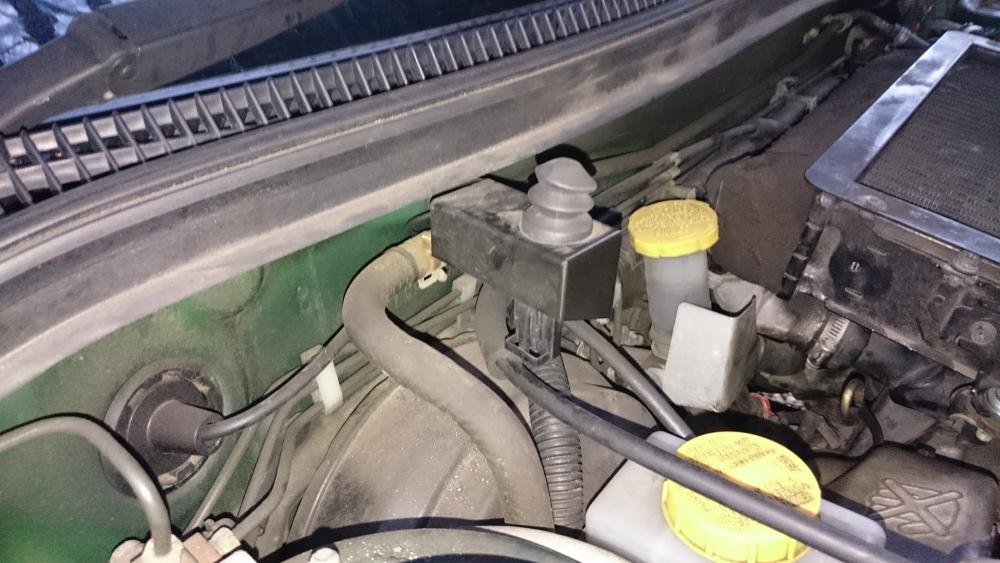
Brilliant! Thank you very much. I looked under the bonnet and the switch has no wires coming from it, so they have obviously forgotten to reconnect it. I have tried looking for any loose wires attached to a connector but without success. Where should I look? I just found that the wire come in from the rear of the switch, and in fact the switch had been bent down a little as you suggested. Now I have bent it back, everything is fine. Once again, thanks.
-
I have a 2001 Forester S Turbo with what I believe to be a SIgma S30 alarm. Up until yesterday everything was fine with the alarm system. The car has been in for a replacement clutch today and now there is a problem with the alarm. Apparently the battery was disconnected for some time and now when I lock the car with the remote, the indicators flash, the alarm beeps for 15 seconds and then goes off. The garage said I had to reprogram the remote but surely it is still programmed as it locks and unlocks the car? Anyway, I tried using the PIN code on the keypad in the glove box and *91 to reprogram the remote, but it is still doing the same thing. Can anyone offer me any help on this?
