
Do Not Sell My Personal Information Jump to content
View in the app

A better way to browse. Learn more.

Subaru Owners Club UK | Subaru Forums

A full-screen app on your home screen with push notifications, badges and more.

To install this app on iOS and iPadOS
  1. Tap the Share icon in Safari
  2. Scroll the menu and tap Add to Home Screen.
  3. Tap Add in the top-right corner.
To install this app on Android
  1. Tap the 3-dot menu (⋮) in the top-right corner of the browser.
  2. Tap Add to Home screen or Install app.
  3. Confirm by tapping Install.

VictoriaYorks

Members
  • Joined

  • Last visited

Everything posted by VictoriaYorks

  1. It's funny, I was with Adrian Flux with my previous car but I had to move away from them when I got my impreza they were that expensive. Keep in mind their admin is shocking, send any paperwork using a registered service. They once sent me a complete set of insurance details for another customer, pretty sure it included payment info too.
  2. I am happy now, but eventually I'll get used to it and want more
  3. Yes an engine tweak is an option but I've had it less than a year, I'm not feeling the need for that yet!
  4. Thanks for the welcome all :) I am planning on upgrading the stereo/speakers as the standard is very tinny. I'm also wanting to make the exhaust more burbly ;)
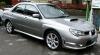
  5. I follow this club on twitter and had to register to reply to this thread... I have a hawkeye WRX and I'm a girl :)
Background Picker
Customize Layout

Configure browser push notifications

Chrome (Android)
  1. Tap the lock icon next to the address bar.
  2. Tap Permissions → Notifications.
  3. Adjust your preference.
Chrome (Desktop)
  1. Click the padlock icon in the address bar.
  2. Select Site settings.
  3. Find Notifications and adjust your preference.
