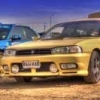
January 16, 201511 yr Well, this dosnt really fit the bill of a car show or a regional meet. This is more of a 2 week holiday for petrolheads. We organised a 10 day trip around Europe in 2011 and ended up with 9 cars and 16 people. Friends for life were made and we all had the best time ever. That was 9 subaru Legacies. This time, the trip is open to whatever car people want to take. It's in September for 2 weeks, will cover about 2100 miles on mainland Europe, take in some of the best driving roads Europe has to offer and will simply be awesome. Anyway, so far we have about 6 cars booked and deposits paid. This is happening. Up til now it's only been mentioned on the UKL legacy forum but I'm now bringing it to here. Any questions, please fire away. Here is the link to the thread which explains everything with video clips from the first run and everything you need. http://www.uklegacy.com/forums/index.php/topic/132077-bob-otherwise-known-as-epic-2/



Create an account or sign in to comment