Do Not Sell My Personal Information Jump to content
View in the app

A better way to browse. Learn more.

Subaru Owners Club UK | Subaru Forums

A full-screen app on your home screen with push notifications, badges and more.

To install this app on iOS and iPadOS
  1. Tap the Share icon in Safari
  2. Scroll the menu and tap Add to Home Screen.
  3. Tap Add in the top-right corner.
To install this app on Android
  1. Tap the 3-dot menu (⋮) in the top-right corner of the browser.
  2. Tap Add to Home screen or Install app.
  3. Confirm by tapping Install.

Advise needed

Featured Replies

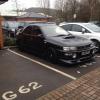
Right I'm new to subaru's having always owned old fast fords! Any way I've picked up an early jdm wrx Classic that's had a body kit fitted sometime in the past, I've removed the kit from the bumpers but when I removed the side skirts there's factory holes in the sills now I'm after a more original look so was wondering what I need to be looking for as a replacement

I also want to lose the wheels and fit a bigger spoiler but again there's so many versions on eBay I'm unshaw what I need??

post-3727-0-47736600-1422896198_thumb.jp


The early classics had black plastic side skirts and rear bumper "hockey sticks"

It would've looked a bit like mine apart from the front splitter and face lift bonnet, lights and grill .

Yours looks like a v1 /v2 93/95 .

So look out for preface v1 /v2 stuff .

Pic with silver wheels is standard v1 94 preface .

Pic with black wheels has got v3/v4 bonnet , lights and grill and p1 splitter all of which are standard subaru stuff just from a slightly later model

post-1399-1422898318_thumb.jpg

post-1399-142289833863_thumb.jpg

  • Author

Thanks mate that's what I need to be looking out for then

Create an account or sign in to comment


Background Picker
Customize Layout

Account

Navigation

Search

Configure browser push notifications

Chrome (Android)
  1. Tap the lock icon next to the address bar.
  2. Tap Permissions → Notifications.
  3. Adjust your preference.
Chrome (Desktop)
  1. Click the padlock icon in the address bar.
  2. Select Site settings.
  3. Find Notifications and adjust your preference.