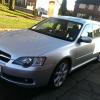
December 14, 201510 yr Hello all, My car went in for some spraying after a bump and when it came out the engine light was flashing. I've read the codes as P0140 bank 1 sensor 2 and P0160 bank 2 sensor 2. It seems unusual that both post cat sensors would pack in at the same time, any ideas as to what could have caused it? Or could it be coincidence? I've cleared them but it comes back on as soon as the engine it started. Also, does anyone have the part numbers for them? I've looked on a website with the parts catalog but am unsure if its 22690AA570 or 22690AA840 or something else? The car is a 56 plate Legacy Spec B Estate (auto). Thanks.
December 14, 201510 yr I'd have a look on importcarparts or give them a ring they'll be cheaper than Subaru. As for both coming on at the same time I'm unsure strange both to come on at once usually one or the other like you said. Maybe you're lucky haha ;)
December 14, 201510 yr I'd first get underneath and check both are still connected. Almost unheard of for both to fail at the same time.
December 14, 201510 yr Not on your own same with me. But as mamber said worth checking them just to see if they've unplugged them for any reason.



Create an account or sign in to comment