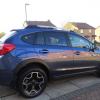
January 22, 201610 yr Spy shots haha well not really but when I was at my local dealers sorting my 4 wheel alignment issue a transporter arrived with some new cars on on it was a new XV diesel, so I bagged a couple of pics :-) I have seen the new spec on other forums but not in the flesh bigger better spoiler new wheel design front bumper / spot light design new grill thoughts??
February 3, 201610 yr I fm think there's much of a difference to worry about. Bonnet scoop would have been nice. Quite like the rear spoiler though and the white glass rear lights
February 8, 201610 yr Author yep the rear lights and spoiler upgrade were the best bits :-) still don't think you can get an auto gear box in the diesel which I think would be also nice for a future upgrade
February 12, 201610 yr On 8 February 2016 at 4:15 PM, Dug said: yep the rear lights and spoiler upgrade were the best bits :-) still don't think you can get an auto gear box in the diesel which I think would be also nice for a future upgrade Suits me to be fair, I'm not a big fan of autos, always used a manual, gives me something to do when I'm driving
February 14, 201610 yr I often drive my CVT manually, with lever flipped across gate and using the paddles. So cool, and impresses the girlfriend(s)! On Chris Evans motoring page, in the Mail on Sunday, there is a box with mention of the new XV. Says only that it has new front, bigger spoiler and alloy wheels (as though it had steels before!).



Create an account or sign in to comment