Do Not Sell My Personal Information Jump to content
View in the app

A better way to browse. Learn more.

Subaru Owners Club UK | Subaru Forums

A full-screen app on your home screen with push notifications, badges and more.

To install this app on iOS and iPadOS
  1. Tap the Share icon in Safari
  2. Scroll the menu and tap Add to Home Screen.
  3. Tap Add in the top-right corner.
To install this app on Android
  1. Tap the 3-dot menu (⋮) in the top-right corner of the browser.
  2. Tap Add to Home screen or Install app.
  3. Confirm by tapping Install.

Featured Replies

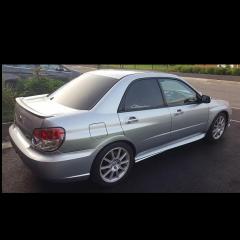
I;ve never been very keen with the wheels on my type R, i have an old set in the garage that need a refurb. can someone photoshop them onto it? then a few different colour options? thinking maybe either black, gunmetal or maybe bronze?

Wheels, Kei Force 8 if someone can find a better picture

P1010009.jpg

P1010005.jpg

P6030023.jpg


and the type R


IMAG0007_zps7b4cc1ec.jpg

20160110_132710_zps5ovzvbpl.jpg


Create an account or sign in to comment


Background Picker
Customize Layout

Configure browser push notifications

Chrome (Android)
  1. Tap the lock icon next to the address bar.
  2. Tap Permissions → Notifications.
  3. Adjust your preference.
Chrome (Desktop)
  1. Click the padlock icon in the address bar.
  2. Select Site settings.
  3. Find Notifications and adjust your preference.