Do Not Sell My Personal Information Jump to content
View in the app

A better way to browse. Learn more.

Subaru Owners Club UK | Subaru Forums

A full-screen app on your home screen with push notifications, badges and more.

To install this app on iOS and iPadOS
  1. Tap the Share icon in Safari
  2. Scroll the menu and tap Add to Home Screen.
  3. Tap Add in the top-right corner.
To install this app on Android
  1. Tap the 3-dot menu (⋮) in the top-right corner of the browser.
  2. Tap Add to Home screen or Install app.
  3. Confirm by tapping Install.

Classic wagon hesitation problem

Featured Replies

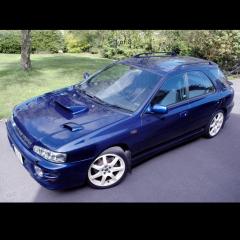
Hi, still new to the site. I've got a classic Impreza wagon v reg.

its got an irritating hesitation nearly all the time, but noticibly worse just cruising/commuting. I've changed the air flow meter and oxygen sensor. But it's still happening. Another problem is it's only boosting at 0.4bar and isn't very Impreza like. Any help would be appreciated!


did you use a gen maf ? 


tried usual plugs and leads?


boost leak?

  • Author
5 hours ago, matt said:

did you use a gen maf ? 


tried usual plugs and leads?


boost leak?

Used a genuine maf yes. Haven't tried plugs and leads yet, I noticed when I unplugged the oxygen sensor it ran almost perfectly so presumed it was the sensor but no better. There were 2 codes, 24 and 32. 32 would more than likely be from me unplugging the oxy sensor and 24 said idle air control valve? ive erased the codes and going to run it and check again. Thanks guys!

  • Author

I thought if you had a boost leak you would hear it? Wooshing out?


Not always but if it's the inlet you can hear it a little trying suck air in 

  • Author

I've done numerous smoke tests on the engine but not luck in finding any leaks.

Smoke tests aren't worth it mate don't show it ifcnot under load 

  • Author

Visual checks only then.☹️

Yeah the inlet is the most problematic !! Getting at it / off is a pig 


Create an account or sign in to comment


Background Picker
Customize Layout

Account

Navigation

Search

Configure browser push notifications

Chrome (Android)
  1. Tap the lock icon next to the address bar.
  2. Tap Permissions → Notifications.
  3. Adjust your preference.
Chrome (Desktop)
  1. Click the padlock icon in the address bar.
  2. Select Site settings.
  3. Find Notifications and adjust your preference.