Do Not Sell My Personal Information Jump to content
View in the app

A better way to browse. Learn more.

Subaru Owners Club UK | Subaru Forums

A full-screen app on your home screen with push notifications, badges and more.

To install this app on iOS and iPadOS
  1. Tap the Share icon in Safari
  2. Scroll the menu and tap Add to Home Screen.
  3. Tap Add in the top-right corner.
To install this app on Android
  1. Tap the 3-dot menu (⋮) in the top-right corner of the browser.
  2. Tap Add to Home screen or Install app.
  3. Confirm by tapping Install.

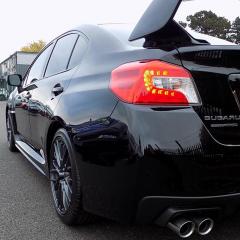
2016 WRX STi - FOR SALE !!

Featured Replies

Hi Guys

Due to my circumstances, I'm selling my STi

See pics...

Open to serious offers. Its only just covered 1'500 miles and condition is as NEW

 

DSCN0939.JPG

DSCN0940.JPG

DSCN0941.JPG

DSCN0944.JPG

DSCN0946.JPG

DSCN0947.JPG

DSCN0948.JPG

DSCN0949.JPG

DSCN0950.JPG

DSCN0951.JPG

DSCN0952.JPG

DSCN0953.JPG

DSCN0954.JPG

DSCN0955.JPG

DSCN0956.JPG

DSCN0957.JPG

  • 1 month later...

Love one of these, just a shame I do 30k/year :-)

Create an account or sign in to comment


Background Picker
Customize Layout

Account

Navigation

Search

Configure browser push notifications

Chrome (Android)
  1. Tap the lock icon next to the address bar.
  2. Tap Permissions → Notifications.
  3. Adjust your preference.
Chrome (Desktop)
  1. Click the padlock icon in the address bar.
  2. Select Site settings.
  3. Find Notifications and adjust your preference.