Do Not Sell My Personal Information Jump to content
View in the app

A better way to browse. Learn more.

Subaru Owners Club UK | Subaru Forums

A full-screen app on your home screen with push notifications, badges and more.

To install this app on iOS and iPadOS
  1. Tap the Share icon in Safari
  2. Scroll the menu and tap Add to Home Screen.
  3. Tap Add in the top-right corner.
To install this app on Android
  1. Tap the 3-dot menu (⋮) in the top-right corner of the browser.
  2. Tap Add to Home screen or Install app.
  3. Confirm by tapping Install.

Featured Replies

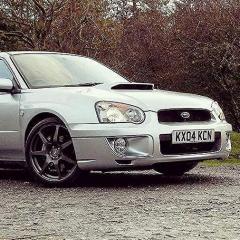
Hello all, ive just signed up to socuk, I bought my Impreza (pictured) last November and I couldnt be happier!

fb cover edited.jpg

edited.jpg


Looks really nice, my fave shape!

  • Author

Cheers, shes my first scoobie, deffinatly not my last!


Yea welcome aboard mate i used to be in the silver wrx club

20160719_153700.jpg

Welcome. I'm part of the silver WRX club. I like your wheels. I'm getting mine painted soon. Probs black but still can make my mind up.

dbc5f75abd4f6f2c7d910fa494cbab61.jpg

  • Author

Yeah, in the pictures when i bought it it had a HKS BOV, (cheap) Coilovers, 18" WR1 Inovite Redline wheels and an aftermarket exhaust. Since then i put stock suspension on (i prefer the slightly raised rally look), Bought a new set of wheels and added a front mount intercooler which meant I had to remove my intake so I now run a green cotton air filter


Very nice. What horses is it at? Or do you have plans to remap? And what did you do with the wheel in the pic?

  • Author

not sure yet when it hits boost the turbo whines like hell thanks to the intercooler pipes, so when i decide whether to keep or remove it ill try get it remapped. I kept the wheels with the plans of getting some winter tyre put on them and keep them for winter or as a spare set

  • Author

Here are the most recent pictures

IMG_1430.JPG

IMG_1490.JPG

IMG_0966.JPG

IMG_0904.JPG

Create an account or sign in to comment


Background Picker
Customize Layout

Configure browser push notifications

Chrome (Android)
  1. Tap the lock icon next to the address bar.
  2. Tap Permissions → Notifications.
  3. Adjust your preference.
Chrome (Desktop)
  1. Click the padlock icon in the address bar.
  2. Select Site settings.
  3. Find Notifications and adjust your preference.