Do Not Sell My Personal Information Jump to content
View in the app

A better way to browse. Learn more.

Subaru Owners Club UK | Subaru Forums

A full-screen app on your home screen with push notifications, badges and more.

To install this app on iOS and iPadOS
  1. Tap the Share icon in Safari
  2. Scroll the menu and tap Add to Home Screen.
  3. Tap Add in the top-right corner.
To install this app on Android
  1. Tap the 3-dot menu (⋮) in the top-right corner of the browser.
  2. Tap Add to Home screen or Install app.
  3. Confirm by tapping Install.

Returning to the Scooby world

Featured Replies

Hi Guys,

I've been MIA for nearly a year! I've been working in secret to achieve my goals i set with my Blob STI and also dealing with a lot of personal life rubbish to go with it!

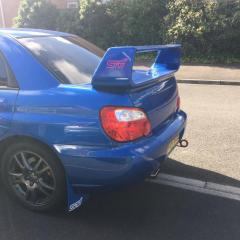
I'm glad to be back in the world again and even happier to announce that I've managed to achieve the happy state of having the car where I want.

After lengthy times in the paint shop, scraped knuckles laid underneath it and a trip to the remap centre at Area 52 I have found a finish point (for now!)

New sharks fins, fog lamp covers and new arches for the exterior.

A full service so I know she is on top form and for peace of mind.

A new hayward and scott up pipe decat and a map got me to the 330Bhp/310 lb/ft mark with no issues at all! 

I can finally sit back and enjoy looking out of the window at her and putting my foot down to feel the power!

Insert cheesy smile :)



Create an account or sign in to comment

Background Picker
Customize Layout

Account

Navigation

Search

Configure browser push notifications

Chrome (Android)
  1. Tap the lock icon next to the address bar.
  2. Tap Permissions → Notifications.
  3. Adjust your preference.
Chrome (Desktop)
  1. Click the padlock icon in the address bar.
  2. Select Site settings.
  3. Find Notifications and adjust your preference.