Do Not Sell My Personal Information Jump to content
View in the app

A better way to browse. Learn more.

Subaru Owners Club UK | Subaru Forums

A full-screen app on your home screen with push notifications, badges and more.

To install this app on iOS and iPadOS
  1. Tap the Share icon in Safari
  2. Scroll the menu and tap Add to Home Screen.
  3. Tap Add in the top-right corner.
To install this app on Android
  1. Tap the 3-dot menu (⋮) in the top-right corner of the browser.
  2. Tap Add to Home screen or Install app.
  3. Confirm by tapping Install.

Featured Replies

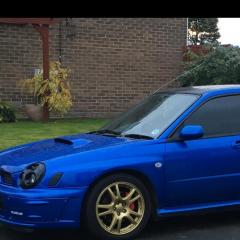
These are afew pics of some very nice scoobs I’ve come across. Most of you will know afew of them. The blue wagon S858 SUG is my old car (which i miss dearly lol). The white classic is another 1 i had N384 AAO, which is currently on ebay again. 

The best 1 out of them and the best subaru I’ve ever seen (IMO) is the black hawkeye T800 MMB, used to be owned by a nice chap called Mario. 

4C9E93C7-673B-42BB-B70A-0A8825196C40.png

FC67EEDD-CC0D-4002-9BD8-0447CFD5F0FC.png

445070C6-0314-4DD5-8263-579AF9D6EDC1.png

368286A1-B240-4E4D-9B7D-45ABF8EC86F3.png

2848C4EF-15EC-4548-9092-3A9D9B015F9C.png

2EF1DF27-F5DC-4616-B7B6-90AB3C0789B5.png

8CC482A0-955F-4B95-BC31-3B2FFBAEA4C1.png

10C5BB62-8A5C-49D5-B187-1AB630349ACA.png

7193B055-6382-4492-ACF6-7921AE4787EE.png

FAD292C0-4DD2-4A36-AAAE-F4602A80F6C8.png

882ADA4F-98D0-4D3E-8D01-509F0C3B0CD0.png

6FBFE690-BD6A-4579-A6C9-C1334557F207.png

D66E9324-B3B9-40AF-B214-1324DDDFF2DE.png

5F17F367-8543-423F-B1B6-91E98C146140.png


Create an account or sign in to comment


Background Picker
Customize Layout

Configure browser push notifications

Chrome (Android)
  1. Tap the lock icon next to the address bar.
  2. Tap Permissions → Notifications.
  3. Adjust your preference.
Chrome (Desktop)
  1. Click the padlock icon in the address bar.
  2. Select Site settings.
  3. Find Notifications and adjust your preference.