Do Not Sell My Personal Information Jump to content
View in the app

A better way to browse. Learn more.

Subaru Owners Club UK | Subaru Forums

A full-screen app on your home screen with push notifications, badges and more.

To install this app on iOS and iPadOS
  1. Tap the Share icon in Safari
  2. Scroll the menu and tap Add to Home Screen.
  3. Tap Add in the top-right corner.
To install this app on Android
  1. Tap the 3-dot menu (⋮) in the top-right corner of the browser.
  2. Tap Add to Home screen or Install app.
  3. Confirm by tapping Install.

2002 WRX NB-R

Featured Replies

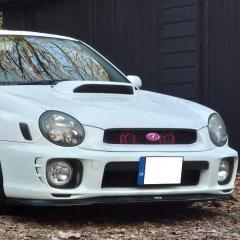
So, thought I post a few piccies of my new (to me) WRX.  It's a 2002 JDM Bugeye SportShift (which I was sceptical about at first, but I really like driving tbh).  It's got a few nice bits and bobs on it, so I plan to just enjoy it as-is for the time being (although I've ordered a front lip today).

media-1.jpg

media.jpg

20190422-141337.jpg

20190422-141348.jpg

20190422-141323.jpg

20190422-141432.jpg

20190422-141512.jpg

20190422-141647.jpg

20190422-141915.jpg

20190422-141915.jpg

20190422-182550.jpg

20190425-175226.jpg


Edited by Bahnstormer


Awsome mate looks super clean, how is the sports shift? Is it fast at shifting

  • Author

Well, for an auto box from 2002 it's pretty good :biggrin:.  It's really smooth as it's going up/down through the gears.  If you put it in "Power" mode it can take a second to think about what it wants to do, then it kicks down pretty hard and propels you towards the horizon pretty damn quickly.  It's the 4EAT so feels almost go-kart like if you're accelerating hard.  If you knock the stick over to shift manually it'll change gear pretty much instantly.

I don't doubt it's no way near as fun as a manual on the twisties, but for sheer straight line acceleration it'll not fail to make you grin :D.

Thats cool mate had no idea subaru done a tyranny like that. 

  • Author

To be honest, neither did I :laugh:.  I thought all WRX's etc had manual boxes, so it was a bit of a surprise when I saw this one.


Create an account or sign in to comment

Background Picker
Customize Layout

Account

Navigation

Search

Configure browser push notifications

Chrome (Android)
  1. Tap the lock icon next to the address bar.
  2. Tap Permissions → Notifications.
  3. Adjust your preference.
Chrome (Desktop)
  1. Click the padlock icon in the address bar.
  2. Select Site settings.
  3. Find Notifications and adjust your preference.