Skip to content
View in the app

A better way to browse. Learn more.

Subaru Owners Club UK | Subaru Forums

A full-screen app on your home screen with push notifications, badges and more.

To install this app on iOS and iPadOS
  1. Tap the Share icon in Safari
  2. Scroll the menu and tap Add to Home Screen.
  3. Tap Add in the top-right corner.
To install this app on Android
  1. Tap the 3-dot menu (⋮) in the top-right corner of the browser.
  2. Tap Add to Home screen or Install app.
  3. Confirm by tapping Install.

2001 Impreza WRX - What issues shall I look for?

Featured Replies

hi guys! 
 

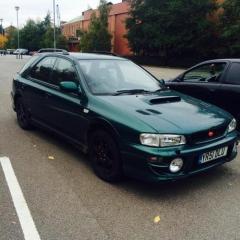
quite new to this site although I joined a few years back. I’m going to look at a 2001 WRX and I was wondering if you could give me a list of problems to look for? I’m doing this off mobile so I’m struggling to find if someone has created a post before so apologies if it has!


cheers 


is it private or from a trader? if trader you can get a specialist to inspect it and if find issues return it for a refund.


make sure they start it from cold when you first get there, look for oily smoke, look for any bubbles in the paint on the rear wings, full service history. Might be worht getting it inspected first?

  • Author

I’m not actually sure mate I’ve just seen it listed. I’ll be sure to check all of that thank you 

Create an account or sign in to comment


Background Picker
Customize Layout

Account

Navigation

Search

Search

Configure browser push notifications

Chrome (Android)
  1. Tap the lock icon next to the address bar.
  2. Tap Permissions → Notifications.
  3. Adjust your preference.
Chrome (Desktop)
  1. Click the padlock icon in the address bar.
  2. Select Site settings.
  3. Find Notifications and adjust your preference.