Do Not Sell My Personal Information Jump to content
View in the app

A better way to browse. Learn more.

Subaru Owners Club UK | Subaru Forums

A full-screen app on your home screen with push notifications, badges and more.

To install this app on iOS and iPadOS
  1. Tap the Share icon in Safari
  2. Scroll the menu and tap Add to Home Screen.
  3. Tap Add in the top-right corner.
To install this app on Android
  1. Tap the 3-dot menu (⋮) in the top-right corner of the browser.
  2. Tap Add to Home screen or Install app.
  3. Confirm by tapping Install.

New Exiga GT owner

Featured Replies

Hi folks! 

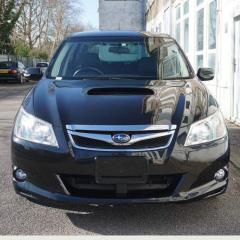
A quick post to say hello as a new 2011 Exiga GT owner (well almost, picking up in 2 days time).

Having 3 small children, I've done the usual trawl of estates, MPVs and SUVs, before stumbling across the Exiga GT whilst nearly biting the bullet on a Forrester XT.

After a test drive, the Exiga wasn't the fastest, but handled fantastic for an "MPV" and leagues apart from the bland and non-Ulez compliant VW Touran I have currently. 

I'll no doubt be asking a lot of questions in the coming weeks and months (first up will be replacing the JDM head unit and fixing the reverse camera), and hope to meet many of you at events in the future!

All the best for 2023, Ben



b5e8a90f0b6f4a868ae98b5c0d9cf75a.jpg

eeab3dd572844a6ea5bb12c0e35582aa.jpg

daf524ba70f6460c8f04774d99ae3d1a.jpg


Create an account or sign in to comment


Background Picker
Customize Layout

Account

Navigation

Search

Configure browser push notifications

Chrome (Android)
  1. Tap the lock icon next to the address bar.
  2. Tap Permissions → Notifications.
  3. Adjust your preference.
Chrome (Desktop)
  1. Click the padlock icon in the address bar.
  2. Select Site settings.
  3. Find Notifications and adjust your preference.