Skip to content
View in the app

A better way to browse. Learn more.

Subaru Owners Club UK | Subaru Forums

A full-screen app on your home screen with push notifications, badges and more.

To install this app on iOS and iPadOS
  1. Tap the Share icon in Safari
  2. Scroll the menu and tap Add to Home Screen.
  3. Tap Add in the top-right corner.
To install this app on Android
  1. Tap the 3-dot menu (⋮) in the top-right corner of the browser.
  2. Tap Add to Home screen or Install app.
  3. Confirm by tapping Install.

Hello There

Featured Replies

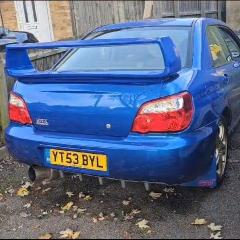
Hi am new to this group. I have owned my very rusty 2003 wrx blobeye since November 2023. I am only 21 and a blobeye impreza in 02c blue has been my dream car. Now i have one that needs a lot of love, so hopefully I can give it the love it deserves.VideoCapture_20240128-011545.jpg.7403b5ff778cb830001403bf6f492f1c.jpg


  • Author

My plan is get it road worthy with the rust and other issues. Add some reliabilty mods to it like cylinder 4 cooling. Then enjoy it while I save to build the 5 speed as I would like a 6 speed swap but I like the ratio of the 5 speed. We will go from there for more power but first I need to sort the bodywork and mechanical side of it 

Create an account or sign in to comment


Background Picker
Customize Layout

Account

Navigation

Search

Search

Configure browser push notifications

Chrome (Android)
  1. Tap the lock icon next to the address bar.
  2. Tap Permissions → Notifications.
  3. Adjust your preference.
Chrome (Desktop)
  1. Click the padlock icon in the address bar.
  2. Select Site settings.
  3. Find Notifications and adjust your preference.