


scoobyfan
Members
-
Joined
-
Last visited
-
 Thats not too far away from me really.
 -
Just looked at there site and they look pretty good. Thanks for the recommendation as we are after someone to be able to put the decals on for us as we want it to look the part and not just slapped on.
-
Mine has done 103k. Runs like a dream.
-
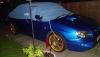
Loads of people have said they like my wheels. I love them. Probably because they are different from everybody elses. Im after putting some subaru decals on down the sides and on the bonnet but dont really want to go ott with it.
-
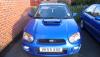
I have attached a couple of photos of my subaru as requested. Have not got that many photos of it yet.
-
Thank you matt
-
I would just like to say a quick hi to you all. I have recently purchased my first subaru impreza wrx so im new to all of this. Also im looking for subaru drives out and would love to join on some of them if im not working.


