
Do Not Sell My Personal Information Jump to content
View in the app

A better way to browse. Learn more.

Subaru Owners Club UK | Subaru Forums

A full-screen app on your home screen with push notifications, badges and more.

To install this app on iOS and iPadOS
  1. Tap the Share icon in Safari
  2. Scroll the menu and tap Add to Home Screen.
  3. Tap Add in the top-right corner.
To install this app on Android
  1. Tap the 3-dot menu (⋮) in the top-right corner of the browser.
  2. Tap Add to Home screen or Install app.
  3. Confirm by tapping Install.

Jimmyrallye

Members
  • Joined

  • Last visited

Everything posted by Jimmyrallye

  1. thankyou :) it be good to get in amongst it again
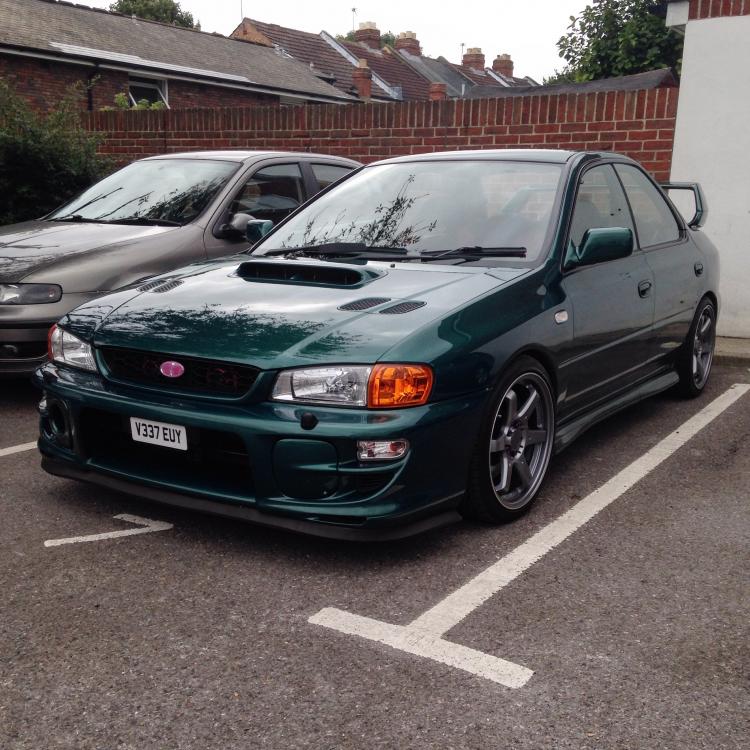
  2. Hi sandels to be honest it's were I want it to be .. Just had both rear arches done which was the main point of buying it , it' was recently dynod at 247bhp mods are td04 turbo new light weight flywheel/clutch 440cc injectors 225 walbro fuel pump it's a very clean straight car
  3. Afternoon guys and girls , recently bought my self a Impreza 2000awd absolutely love the thing !! Was bang in the jap scene with my local club hjc back in the day over (5 years ago) starting a family and buying a house put a end to my pipe dream :( but I'm back now . First Impreza got a little niggle regarding how to wire in brake light in spoiler but no biggy! Any way nice to meet you , jimmy

Background Picker
Customize Layout

Account

Navigation

Search

Configure browser push notifications

Chrome (Android)
  1. Tap the lock icon next to the address bar.
  2. Tap Permissions → Notifications.
  3. Adjust your preference.
Chrome (Desktop)
  1. Click the padlock icon in the address bar.
  2. Select Site settings.
  3. Find Notifications and adjust your preference.