Turnerdv10
Members
-
Joined
-
Last visited
-
No I don’t . I think it may be worth while going to somewhere who does Subaru mapping and rolling roads
-
They look a pain in the !Removed! to change . Checked first plug they don’t appear that old. Spoke to another Subaru mapper and they said nothing wrong with it . Hmmmm
-
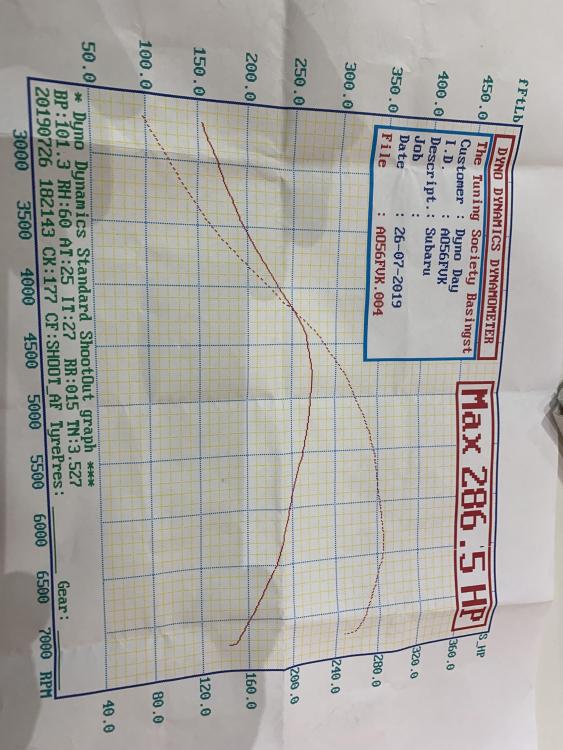
It’s a wrx 2.5 sti prodrive supposed to be running 316bhp from new that is . Done 86k miles . Obv it’s lost a few horses since new . Also noticed on way hone is hesitating from 4000 rpm so can’t be a good sign lol . The bloke was saying it’s a very slow pickup and should not be like that .
-
Does this look right to you as do a power run and bloke said There’s def a problem on pickup .
-
Unfort not lol . I can read the sensor not a problem . Strange thing is before I turn the wheel it states it’s at 2049 then when I turn it slightly it zeros out and then value obv changes from left to right . The clock spring is def aligned I had to turn it about 4 times round to line up the arrow and line . But strange each time it states 2049 then changes to zero .
-
Anyone ???
-
Steering angle sensor saga . I need some help I changed the heater matrix on my wrx sti Hawkeye 2006 . I unbolted the column and left it loose . Put everything all back together and got P1767 steering angle sensor fault . Tried 3 good ones and they worked till I turned the steering wheel a fraction . I’m lost . Any ideas . I lined up the steering angle sensor arrow to small line . Round squib round to right then back 3 1/4 turns connected angle sensor lined it up to triangle on cowling . Can’t see where I am going wrong . Can someone shed any light as there’s no way I could if disturbed anything by taking the dash out as there’s nothing there to interfere with it .
-
It’s quite bad when they recognise you lol in the space of a month
-
Has anyone got a walk through on changing the heater matrix on the Hawkeye . I understand everything has to be stripped out . Just in case I miss any hidden bolts etc .
-
Mine is wrx sti Hawkeye prodrive and getting 15mpg lol . A lot of short journeys tho
-
Ok no prob I’ll wait till it gets worse then I’ll put a louder exhaust on lol
-
They should tell everyone before you buy a wrx sti to expect big bills every week . Does anyone know what the best gear oil and brand to put in the wrx sti Hawkeye gearbox 6 speed to quieten it down . Sick of the whining especially if going down a hill in gear or low gears . It prob needs looking at but will have to wait till summer . Garage before me I think put 75/90 don’t know what brand. Been gradually getting worse .
-
I’ve checked all the pipes I can see . This morning is drive perfect and it felt it boosted fine (didn’t have computer connected tho ,typical ) This afternoon holding back low down .and felt jerkiness accelerating . This evening ran fine . Hmmmm .
-
I know I uploaded this information to see if anything was amiss . I’ll have to get someone to look at it who knows what there doing as while driving its now holding back when turbo cuts in. Could be anything lol .
-
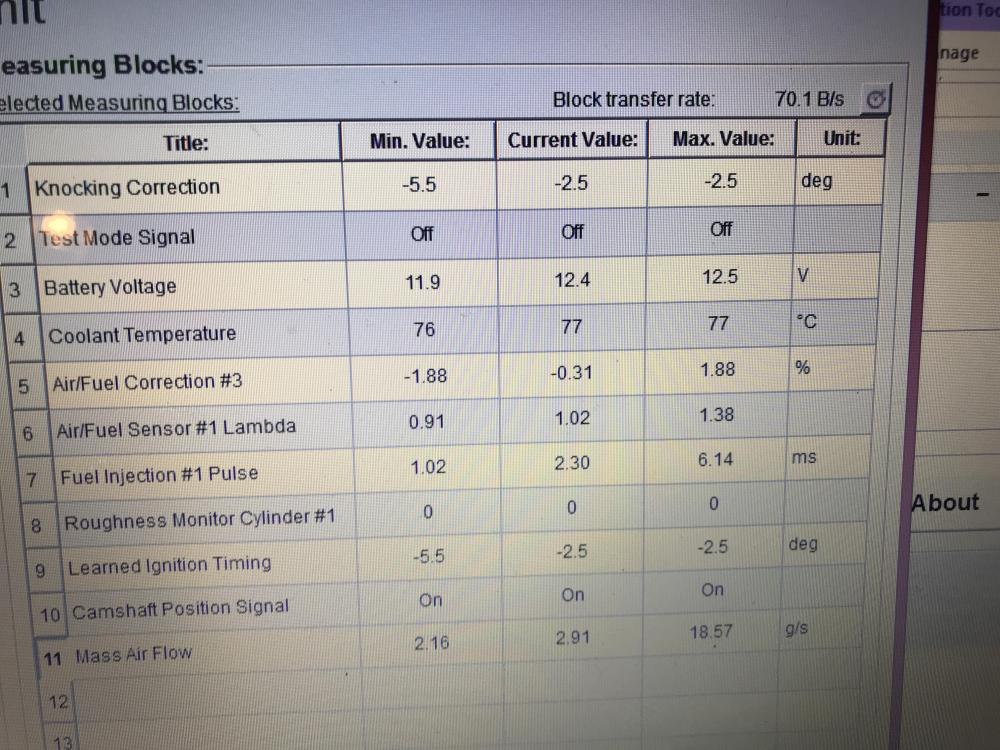
I’m just reading it off the on board computer . I have plugged into and as usual no fault codes showing but knock correction is -2.5 and air fuel correction is -1.88 . So obv the ignition timing is -2.5 I assume that’s right .