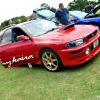
July 9, 201510 yr Hey I'm Ned and im 27 and from Derbyshire I drive a 96 Tommy kaira Subaru Impreza wagon Sent from my iPhone using Tapatalk
July 9, 201510 yr Author Oh right I'm trying to find out how many are about on UK roads Sent from my iPhone using Tapatalk
July 9, 201510 yr Author Gunna start going the shows next year I think Sent from my iPhone using Tapatalk
July 9, 201510 yr I doubt you'd ever find the true number, due to it being an import- a lot get put through as lower spec models, for insurance reasons I'd imagine. But I think it's fairly safe to say you're in the motoring equivalent of rocking horse ****! Sent from my iPhone using Tapatalk
July 10, 201510 yr welcome! seen one of these in the flesh few years ago, was up for sale and was pondering over it
July 10, 201510 yr Author Hey yeah I was after the r33 skyline Tommy k but couldn't find one n seen this n liked the look of it but I'm glad I've got it now :) Sent from my iPhone using Tapatalk
July 10, 201510 yr Author Just thinking of bits to do to it atm because it's standard Sent from my iPhone using Tapatalk
July 10, 201510 yr key points with subarus : handling : uprated arb's anti lift kits suspension / coilover kits bushes Engine: pretty much remap needed for anything you do



Create an account or sign in to comment