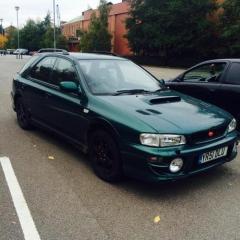
March 12, 201610 yr I've currently got a 51 Plate Subaru Impreza Wagon 2.0 4WD NA but can't seem to find any parts for it. I know people will say it's not worth doing but I can't get insured on a Turbo'd model because I'm 19. Can anyone direct me to any? Cheers.
March 12, 201610 yr It's always worth doing. What parts are you after? Importcarparts.co.uk are a good stocker of genuine Subaru parts
March 12, 201610 yr Author Not really too sure if I am honest. Just something to change it up a little add a bit more power, seems to be fairly slow for what it is.
March 12, 201610 yr Weight reduction and chassis mods for n/a. The 4WD is a cumbersome set up for a na engine plus the added weight compared to similar cars in the same bracket.
March 12, 201610 yr i had a 2.0 sport as my 1st n second scoobys,loved both but not the fastest car.i was told by firms you wont get much more then 20bhp with mods if your lucky so best way to go is probly a exhaust that help't a bit and a air filter,after that i would spend my money on the handling side and making it look sweet,if your interested i have a set of sti clocks with 79000 mile on them,blue dials and shift light in the rev counter, £40 posted just remembered i have some sti blue door cars as well £40 posted Edited March 12, 201610 yr by aucky
March 12, 201610 yr Drive it, enjoy it. Work out what you want from it, probably lowering, exhaust and a panel filter, then if it was me I'd focus on the in car side and maybe a couple of cosmetic bits (I'd avoid going for a wrx/sti rep tho, I find it just baits attention then you'd get overtaken by a 1.6 corsa) Sent from the moon using telepathy



Create an account or sign in to comment