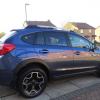
March 28, 20169 yr well after the wait my new door sills have arrived and I finally got round to fitting them. these are aftermarket ones as genuine ones are stupid money, and to be fair I like these better they look great and fit well happy :-)
March 28, 20169 yr Where did you get them from. What model scooby they for? Sent from my iPhone using Tapatalk
March 28, 20169 yr Author Hi Phila67 they came from China bought through ebay from "autoparts0522" they are for my Subaru XV they came very fast to be fair and very well packaged and a great price too....
March 30, 20169 yr Author Simple Clean area Line up Stick on They come with a very thin double sided tape fitted Sent from my SM-N910F using Tapatalk
March 30, 20169 yr Not sure how they'd look on my white sill though, look great on your dark paint though Sent from my iPhone using Tapatalk



Create an account or sign in to comment