Do Not Sell My Personal Information Jump to content
View in the app

A better way to browse. Learn more.

Subaru Owners Club UK | Subaru Forums

A full-screen app on your home screen with push notifications, badges and more.

To install this app on iOS and iPadOS
  1. Tap the Share icon in Safari
  2. Scroll the menu and tap Add to Home Screen.
  3. Tap Add in the top-right corner.
To install this app on Android
  1. Tap the 3-dot menu (⋮) in the top-right corner of the browser.
  2. Tap Add to Home screen or Install app.
  3. Confirm by tapping Install.

Featured Replies

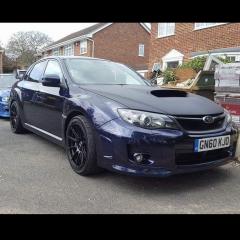
hi everyone new on here but to scoobys I'm on 4th scooby I've had 04 wrx, 03 sti, 05 sti widtrack and now got 2011 wrx sti fully forged closed dec running 400hp just wondering any meet up in kent here's a few pics of my cars I've had and my 2011 thanks

FB_IMG_1498304871357.jpg

FB_IMG_1498343683370.jpg

FB_IMG_1498304735518.jpg

FB_IMG_1498304690066.jpg

FB_IMG_1498304708660.jpg


Hello & welcome @scoobyghost is your man for the kent area meets


Sent from my SM-G930F using Tapatalk


  • Author

yes mate its fun car and sounds good haven't had long but it goes

  • 2 weeks later...

Create an account or sign in to comment


Background Picker
Customize Layout

Configure browser push notifications

Chrome (Android)
  1. Tap the lock icon next to the address bar.
  2. Tap Permissions → Notifications.
  3. Adjust your preference.
Chrome (Desktop)
  1. Click the padlock icon in the address bar.
  2. Select Site settings.
  3. Find Notifications and adjust your preference.