Do Not Sell My Personal Information Jump to content
View in the app

A better way to browse. Learn more.

Subaru Owners Club UK | Subaru Forums

A full-screen app on your home screen with push notifications, badges and more.

To install this app on iOS and iPadOS
  1. Tap the Share icon in Safari
  2. Scroll the menu and tap Add to Home Screen.
  3. Tap Add in the top-right corner.
To install this app on Android
  1. Tap the 3-dot menu (⋮) in the top-right corner of the browser.
  2. Tap Add to Home screen or Install app.
  3. Confirm by tapping Install.

Featured Replies

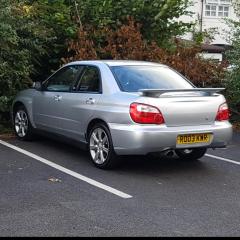
Due to have my wheels powder coated in the next few weeks . Still can't decide on a colour ... any suggestions?

20170904_165142.jpg


Baby blue. 1b66e3899b3d5eae1de54043b824dee1.jpg

Sent from my SM-G935F using Tapatalk

These are mine on same colour car
7d290e8d6aa0b3fde059aea1ba8344d4.jpg
808f16b4da9a9a755f6a8a4b153df966.jpg

And they are the same colour on both sides, even though they look different.

Anthracite, Bronze or Gold :thumbsup:

  • Author

Gone for anthracite with metallic flakes.


Great choice - chuck some pictures on if you get a chance :thumbup1:

Create an account or sign in to comment


Background Picker
Customize Layout

Configure browser push notifications

Chrome (Android)
  1. Tap the lock icon next to the address bar.
  2. Tap Permissions → Notifications.
  3. Adjust your preference.
Chrome (Desktop)
  1. Click the padlock icon in the address bar.
  2. Select Site settings.
  3. Find Notifications and adjust your preference.