Do Not Sell My Personal Information Jump to content
View in the app

A better way to browse. Learn more.

Subaru Owners Club UK | Subaru Forums

A full-screen app on your home screen with push notifications, badges and more.

To install this app on iOS and iPadOS
  1. Tap the Share icon in Safari
  2. Scroll the menu and tap Add to Home Screen.
  3. Tap Add in the top-right corner.
To install this app on Android
  1. Tap the 3-dot menu (⋮) in the top-right corner of the browser.
  2. Tap Add to Home screen or Install app.
  3. Confirm by tapping Install.

09 Subaru Impreza WRX Hatchback

Featured Replies

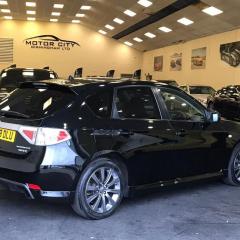
Subaru Impreza WRX hatchback. A low 48,500 miles, the last 6,000 of which have been mainly motorway miles including a trip to Slough in the recent snow where this car shined. A recent service and cambelt change done in the last 12 months, and a full set of new tyres less than three months ago.

Available on eBay but open to offers.

Main Points

  • Cambelt changed at 42,500 (didn't need doing, just to keep it inline with servicing recommendations)
  • Full set of new tyres at 46,500
  • Some service history, last done at 42,293 (no stamp but receipts)
  • MOT until May 2018
  • Unmodified apart from a new aerial and an auxiliary cable for the radio (so you can play music from your phone)

You Should Know

Although this car is still my daily driver, the clutch is on its way out and I would expect it to need doing in the very near future. The local Subaru specialists (ScoobyWorld) can supply and fit a stage 1 for around £600 (this is reflected in the pricing).

There is also wear to the drivers side door handle as pictured.

Subaru Front Passenger.jpg

Subaru Front Driver.jpg

Subaru Rear Driver.jpg

Subaru Rear Passenger.jpg

Subaru Rear Seats.jpg

Subaru Front Seats.jpg

Subaru Dash.jpg

Subaru Drivers Side Handle.jpg

Subaru Tread Left.jpg

Wheel.jpg


  • Author

Will be willing to take £6k if it goes in the next 7 days.

  • 2 weeks later...
  • Author

Price lowered to 5,500 if gone by Saturday afternoon. Interested drop me a text on 07904942823.

Create an account or sign in to comment


Background Picker
Customize Layout

Account

Navigation

Search

Configure browser push notifications

Chrome (Android)
  1. Tap the lock icon next to the address bar.
  2. Tap Permissions → Notifications.
  3. Adjust your preference.
Chrome (Desktop)
  1. Click the padlock icon in the address bar.
  2. Select Site settings.
  3. Find Notifications and adjust your preference.