Do Not Sell My Personal Information Jump to content
View in the app

A better way to browse. Learn more.

Subaru Owners Club UK | Subaru Forums

A full-screen app on your home screen with push notifications, badges and more.

To install this app on iOS and iPadOS
  1. Tap the Share icon in Safari
  2. Scroll the menu and tap Add to Home Screen.
  3. Tap Add in the top-right corner.
To install this app on Android
  1. Tap the 3-dot menu (⋮) in the top-right corner of the browser.
  2. Tap Add to Home screen or Install app.
  3. Confirm by tapping Install.

Hello again 😂.

Featured Replies

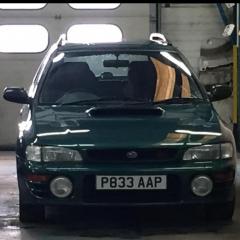
I’m getting married on the 1st of September 2018 and was thinking about cars to get to the wedding.I was wondering if two Subaru’s would be available on the day to take my wife to be and her dad and bridesmaids and my self later on from Castleton in Derbyshire to edale the church and back to edale .I think it’s roughly 6 to 10mile each way for roughly an hour and a half at the most obviously I would pay for fuel 


If you can change the venue to sunderland,  i,d do it free of charge, well slice of cake.:laugh:

All the very best to and bride.

Ray

as above, get married in St Albans and i'm in,,,foc.


:biggrin:

  • 3 weeks later...

Congratulation to you :biggrin: , Subaru for picking up your wife and family, it sounds very great, so would you like to lend 2 Subaru?


Create an account or sign in to comment


Background Picker
Customize Layout

Account

Navigation

Search

Configure browser push notifications

Chrome (Android)
  1. Tap the lock icon next to the address bar.
  2. Tap Permissions → Notifications.
  3. Adjust your preference.
Chrome (Desktop)
  1. Click the padlock icon in the address bar.
  2. Select Site settings.
  3. Find Notifications and adjust your preference.