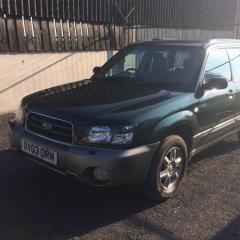
February 17, 20206 yr Hi All, I am pretty new to the forum. Found it when my car broke and I needed help sorting new front lower control arms. That is fixed now, but I have decided to stick around a bit, enjoy others builds and get help when I need it with mine. So, about me. I am currently still in my late teenage years, and at University studying Off Highway Automotive Engineering. Been into mechancial things for years, had my own projects (Been building and racing lawn mowers for the last 6 years) and would say I am alright with spanners. Spent the last 2 summers working with a classic car race team too. I have a Subaru Forester from 2003, 2.0 NA. Not bad for a first car I don't think. I plan on doing almost all the work that it needs myself. Already done an engine oil and filter change, plus fitting 2 alloy front lower control arms. Not got too much money being a student, but want to spend money where worth it on this car, make it last for years. I look forward to spending more time on here, and probably getting lots of nice parts for my car I don't really need and can only just afford as a result. Here are a few photos
February 18, 20206 yr A slightly belated Wotcha and welcome - as you have seen already plenty of Fozzie experience on here so feel free to set up a build thread and keep a track of your progress 👍



Create an account or sign in to comment