Do Not Sell My Personal Information Jump to content
View in the app

A better way to browse. Learn more.

Subaru Owners Club UK | Subaru Forums

A full-screen app on your home screen with push notifications, badges and more.

To install this app on iOS and iPadOS
  1. Tap the Share icon in Safari
  2. Scroll the menu and tap Add to Home Screen.
  3. Tap Add in the top-right corner.
To install this app on Android
  1. Tap the 3-dot menu (⋮) in the top-right corner of the browser.
  2. Tap Add to Home screen or Install app.
  3. Confirm by tapping Install.

Featured Replies

Hi

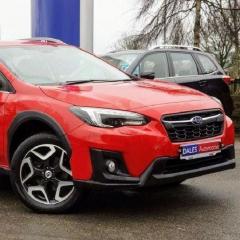
Picking up my first subaru next week,a late 2018 xv premium we and can't wait.

my history of cars is mainly with the slightly niche brands,a long time with Saab and Alfa Romeo although I'm trading in my Bmw m140i for the xv....unfortunately the bmw was a bit of a mistake,too mainstream and I never bonded with it sadly despite the fantastic engine.

So,looking forwards to getting to know the Subaru,a brand that I've long thought would suit me and our way of life down to the ground😁

Screenshot_20200225_123441_uk.co.autotrader.androidconsumersearch~2.jpg


Create an account or sign in to comment


Background Picker
Customize Layout

Configure browser push notifications

Chrome (Android)
  1. Tap the lock icon next to the address bar.
  2. Tap Permissions → Notifications.
  3. Adjust your preference.
Chrome (Desktop)
  1. Click the padlock icon in the address bar.
  2. Select Site settings.
  3. Find Notifications and adjust your preference.