Do Not Sell My Personal Information Jump to content
View in the app

A better way to browse. Learn more.

Subaru Owners Club UK | Subaru Forums

A full-screen app on your home screen with push notifications, badges and more.

To install this app on iOS and iPadOS
  1. Tap the Share icon in Safari
  2. Scroll the menu and tap Add to Home Screen.
  3. Tap Add in the top-right corner.
To install this app on Android
  1. Tap the 3-dot menu (⋮) in the top-right corner of the browser.
  2. Tap Add to Home screen or Install app.
  3. Confirm by tapping Install.

New member, Impreza WRX #SCOOBYJORDUK

Featured Replies

Hey guys!


only just found this site and joined right in!


feel free to check out my Instagram and YouTube channel also! #SCOOBYJORDUK  in the search

looking forward to helping and receiving info from everyone!

70CA24B3-7676-4B25-A18C-3BF6D4E34273.jpeg


  • Author

Hey mate!


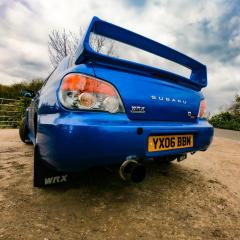
yeah so she’s done some miles 120k.. she’s clean but not perfect has bumps and scrapes but it’s a 14 year old car lol.

so yeah STI spoiler, back box, full decat, turbosmart dual port BOV. K&N panel filter, Prosport boost gauge. All sound system upgraded and head unit: exeedy pink box stage 1 clutch and lightweight flywheel 

That’s probly about it. Now just waiting on a remap for it lol

Create an account or sign in to comment


Background Picker
Customize Layout

Account

Navigation

Search

Configure browser push notifications

Chrome (Android)
  1. Tap the lock icon next to the address bar.
  2. Tap Permissions → Notifications.
  3. Adjust your preference.
Chrome (Desktop)
  1. Click the padlock icon in the address bar.
  2. Select Site settings.
  3. Find Notifications and adjust your preference.