Jump to content
View in the app

A better way to browse. Learn more.

Subaru Owners Club UK | Subaru Forums

A full-screen app on your home screen with push notifications, badges and more.

To install this app on iOS and iPadOS
  1. Tap the Share icon in Safari
  2. Scroll the menu and tap Add to Home Screen.
  3. Tap Add in the top-right corner.
To install this app on Android
  1. Tap the 3-dot menu (⋮) in the top-right corner of the browser.
  2. Tap Add to Home screen or Install app.
  3. Confirm by tapping Install.

Black WRX STI

Featured Replies

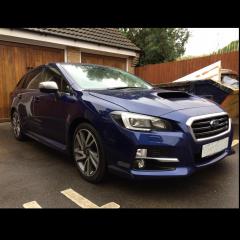
My NY Resolution was to post every Subaru Isaw on here in the off-chance it was someone. Finally got round to it (only missed three, I think), so here goes...

New / last shape (sorry, I don't know the correct description) followed me through Marston Moretaine (yes, the home of Captain Tom!) this afternoon, just before 4 pm. Was at least 100 yds behind all the way so I couldn't see the year, but was very shiny!

Nice to see another Subaru around these parts.



Create an account or sign in to comment


Background Picker
Customize Layout

Account

Navigation

Search

Configure browser push notifications

Chrome (Android)
  1. Tap the lock icon next to the address bar.
  2. Tap Permissions → Notifications.
  3. Adjust your preference.
Chrome (Desktop)
  1. Click the padlock icon in the address bar.
  2. Select Site settings.
  3. Find Notifications and adjust your preference.