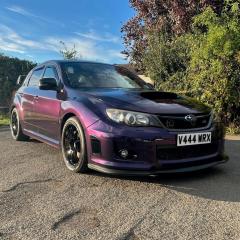
October 22, 20205 yr Hi All, A couple of weeks back my car got hit in my work car park and the other car has left a mark down the side. I was going to get just this part fixed but I noticed that I had a few other imperfections and marks. My question is how much would a full car respray cost roughly on a 2011 WRX STI and does anyone have any recommendations on who to go with? Another option I was looking at was wrapping the car myself (as it is something that I want to learn). Any advice would be appreciated.
October 23, 20205 yr depends what sort oif job you want done. To do it properly glass out, disasembly where required (some go full engine out) could be anywhere from 2k and up for the time needed to do it right.
October 23, 20205 yr Author 40 minutes ago, Tidgy said: depends what sort oif job you want done. To do it properly glass out, disasembly where required (some go full engine out) could be anywhere from 2k and up for the time needed to do it right. Okay thank you. I will try and get a few quotes and see what sort of prices come back.
October 23, 20205 yr Make sure you get a prob description/list of what is included in the price. Makre sure you are comparing apples with apples 🙂
October 23, 20205 yr Author 17 minutes ago, Tidgy said: Make sure you get a prob description/list of what is included in the price. Makre sure you are comparing apples with apples 🙂 That's a good idea. I will make sure to do that 🙂



Create an account or sign in to comment