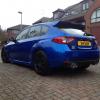
October 6, 201312 yr Just thought id say hi as i've just joined the club. I had a 99reg turbo 2000 a few years ago and loved it, messed about with a few different cars in between, but finally back in an impreza, really missed the engine. love it!
October 6, 201312 yr Hi mate welcome back to the best car's on earth... Well almost I know what you mean about the engine I don't think there is any other car that gives you the burble that people know is a Subaru :D And very nice looking hatch/sharkeye if I do say so myself
October 6, 201312 yr Author Cheers bud, still lacking the burble due to the equal length headers but still sounds good all the same, ha.
October 6, 201312 yr Your not far from me I live across the otherside of the water sorry just noticed :D And oh :( equal headers But it's got the most important bit's about it like the badge and the best colour and power :D
October 6, 201312 yr wotcha and welcome - lovely motor,and they know a thing or two about fettling those litchfield chaps& chapesses



Create an account or sign in to comment