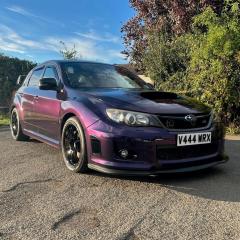
October 28, 20223 yr My 2011 Subaru STI is now for sale as I have picked up a new scooby. I have included a link to the ebay listing as well as the spec below. Open to sensible offers. https://www.ebay.co.uk/itm/144786063680 FOR SALE: Selling my 2011 Subaru WRX STI due to getting a new car. It has been well looked after and regularly serviced. I’m only the 2nd owner and I have all the paperwork for any work completed on the car. Few age related marks (spoiler could do with being repainted and also the front bumper got clipped in my work car park (pictured). Happy to knock a bit off the price to cover that get re wrapped. Private reg will not be included as it is getting moved to the new car. I have included the spec below: - Wrapped in midnight purple - Upgraded brakes and pads - Full STI lip kit - Custom chrome racing exhaust - RCM adjustable spoiler - Rear vortex generator - Enkei RPF01 wheels (white) - 340R pack so running 340bhp - 79000 miles Also includes: - JDM wing mirrors wrapped in midnight purple (not fitted) - Rear diffuser (not fitted) If you have any further questions please drop me a message.
November 7, 20223 yr Author Price dropped to £15000 and has been relisted for longer. Open to offers either via ebay or on here. Feel free to get in touch if interested. https://www.ebay.co.uk/itm/144795547568



Create an account or sign in to comment