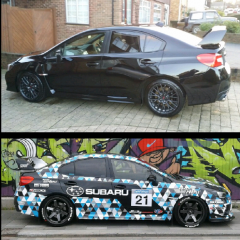
8 hours ago8 hr I am back 👋🏻any OG’s still here ? I have got a very cool Sti I need to dust off. Some may know. Been very long time in hinding. Sometimes it’s not just the car that needs fixing. but hey what don’t kill you makes you stronger right lol. But I been looking back at all good times and build of my car sparked a new interest. I even got a room of parts I never fitted. Some pretty cool parts two. So if we know each other or remember me or you new come say 👋🏻 hi. I can be quite handy with a Subaru to so need any help. Ask away
7 hours ago7 hr Hi Sparky....welcome back to the ClubYou know how it all works so crack on and tell us about your current project and the parts you have for it.Good to see you back in the fold
5 hours ago5 hr Author Thanks I get updating later.on the computer as my phone pants now days. Like most services now lol 😂



Create an account or sign in to comment