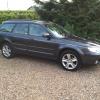
July 17, 201411 yr Big thanks to gambit. He put me in touch with perry of revolution wraps who has done my windows today. He's made a great job and am really happy. Having done one of my cars before i know how hard it is and he made the outback look ridiculously easy, always the mark of a true professional. On mine he didn't need to take the windows out but on normal cars he does so that it is a "proper job". Price was good i felt too. Based in lincoln so not that far from me. www.revolutionwraps.co.uk 07553 338885 Am going to get him to do the wifes audi as well :-) While i was there a chap in a range rover which perry had wrapped turned up. I honestly thought it had been painted as the quality was excellent. Cheers Alan
July 17, 201411 yr Just seen Perry actually at the school he said he had seen you today :) And looks loads better if I do say so myself. Perfect to line up with the rest of the scoobs on meet night for a photo now ;)
July 19, 201411 yr Alan....can I ask what % tint (or however they refer to it) you got, as this looks just right and I'd like to know for future please? Cheers mate [emoji106] Sent from my iPhone using Tapatalk
July 19, 201411 yr Author No worries. He called it factory tints. I think it is one down from the limo black. Same stuff as they use on range rovers and Mercs etc. does look nice though but you can still see out at night :-)



Create an account or sign in to comment