Do Not Sell My Personal Information Jump to content
View in the app

A better way to browse. Learn more.

Subaru Owners Club UK | Subaru Forums

A full-screen app on your home screen with push notifications, badges and more.

To install this app on iOS and iPadOS
  1. Tap the Share icon in Safari
  2. Scroll the menu and tap Add to Home Screen.
  3. Tap Add in the top-right corner.
To install this app on Android
  1. Tap the 3-dot menu (⋮) in the top-right corner of the browser.
  2. Tap Add to Home screen or Install app.
  3. Confirm by tapping Install.

Jdmv4sti

Members
  • Joined

  • Last visited

Everything posted by Jdmv4sti

  1. No bother. I had to get mine replaced a couple of years ago. It failed an mot due to a crack on the drivers side. Was something like half a millimetre over the threshold. Was annoying, but not as annoying as my insurance company. They told autoglass I had a bugeye and came out with the wrong windscreen twice.
  2. If you don't have windscreen cover on your insurance try autoglass. I'm sure they do repairs for a small excess as long as you're fully comp and they deal with your insurance company.
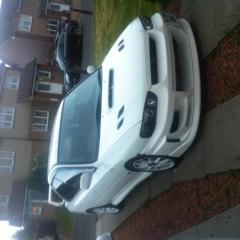
  3. Stared at my car and wondered if I should stick to the blobeye chargespeed bumper I modded for my classic or have I made a mistake and go back to my wrc bumper and make a custom splitter for it....
  4. Thanks. I will probably make a mould then work with copies of them because if I mess up or they get damaged. I will probably never find another set. They're off a coupe so I have to split the back ones or stick them on as is and make my passengers climb in through the front.
  5. Thanks for the feedback everyone. Also thinking about modding a set of classic Tommy Kaira arches to widen it out,putting wider side skirts and putting the chargespeed rear bumper on with the carbon diffuser. Here's the front one to give an idea how it will look.
  6. Hi .I modified a blobeye chargespeed bumper to fit my classic. What do you think?

Background Picker
Customize Layout

Configure browser push notifications

Chrome (Android)
  1. Tap the lock icon next to the address bar.
  2. Tap Permissions → Notifications.
  3. Adjust your preference.
Chrome (Desktop)
  1. Click the padlock icon in the address bar.
  2. Select Site settings.
  3. Find Notifications and adjust your preference.