Skip to content
View in the app

A better way to browse. Learn more.

Subaru Owners Club UK | Subaru Forums

A full-screen app on your home screen with push notifications, badges and more.

To install this app on iOS and iPadOS
  1. Tap the Share icon in Safari
  2. Scroll the menu and tap Add to Home Screen.
  3. Tap Add in the top-right corner.
To install this app on Android
  1. Tap the 3-dot menu (⋮) in the top-right corner of the browser.
  2. Tap Add to Home screen or Install app.
  3. Confirm by tapping Install.

RosieFreak

Members (FB)
  • Joined

  • Last visited

Everything posted by RosieFreak

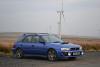
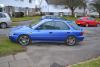
  1. Hey all. After years of driving a Fix It Again Tony - Punto, I bought myself an 1997 Impreza WRX Wagon when I returned from sea in January. . Its an absolute pleasure to drive and despite its age the car is in great condition. I am not looking to go mad with the car but want to bring it back to as near as I to new, plus a few wee perks. I've attached a couple of photos. I would love some ideas of what work to carry out on the car. So any suggestions would be great. Cheers guys.
Background Picker
Customize Layout

Account

Navigation

Search

Search

Configure browser push notifications

Chrome (Android)
  1. Tap the lock icon next to the address bar.
  2. Tap Permissions → Notifications.
  3. Adjust your preference.
Chrome (Desktop)
  1. Click the padlock icon in the address bar.
  2. Select Site settings.
  3. Find Notifications and adjust your preference.