April 7, 201511 yr Hi guys, came across this site by accident when searching on google so thought i'd say hello. Current car is a Volvo V50, my other one is currently parked up at scoobyclinic awaiting removal of the engine with a rattly crank. Not ideal lol
April 7, 201511 yr Hi n welcome Sorry to hear about the knackered crank but hey good excuses for a upgraded rebuild don't come "knocking" too often
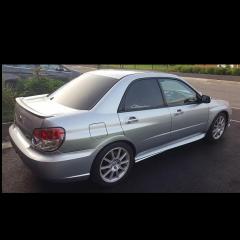
April 7, 201511 yr Author haha , im guessing you don't want pics of the volvo? lol V5 type R :) This was taken a while back when i had a syvecs fitted and was being mapped
April 7, 201511 yr Hi tidgy I thought you had signed up before you are the tidgy from other sites scoobynet and one you're a moderator on one ? But anyway welcome along if it is you mate [emoji106] and what took you so long lol [emoji12]
April 7, 201511 yr Author yeah on most forums as Tidgy :) let me sign up on here no probs so must beone i missed hahahaha
April 7, 201511 yr We all seem to like quite a variety of different marques of motors and accept that we all have different tastes on here but could we.... um ....refrain from the volvo pics
April 7, 201511 yr Author Its not that far from standard at the min, mods are currently, I got the syvecs from a mate who was stripping his car so managed to grab it cheap just when i was getting a remap anyway :) 330mm AP 4 pot from brake's rear new age brembo brakes Gt Gen spec 2 headers Full scr decat Harvey smith up pipe Factory option OZ wheels (think variation on supertourismo) Syvecs Retrimmed steering wheel Uprated excede clutch Turbo was struggling and only made 290, had gone in for new turbo and few other bits and bobs. They clocked a rattle from the crank second the fired it up the night i dropped it off, so now needs a rebuild. Not sure on route yet, 2.0, 2.1 and 2.5 are all possible options :)



Create an account or sign in to comment