July 17, 201312 yr allright folks my name is david never mind the user name just one i always use lol im from glasgow im 22 years of age i have been driving for 6 years this is my first subaru so far any help would be greatly appreciated if there is anything else you wanna know just let me know and i will tell you all i can thanks for looking and look forward to getting to know alot of you
July 17, 201312 yr welcome aboard pal, have a look around, sit down and enjoy the true randomness that is the S.O.C.
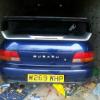
July 17, 201312 yr Hi mate welcome to S.O.C feel free to share any pictures of your car. Or any underwear :D
July 23, 201312 yr Wotcha and welcome - as Gambit says would be great to see some pictures - any issues just stick up a new thread - lots of great input on this forum... which then does tend to dissolve into a fair degree or randomness ;)
July 23, 201312 yr Author Ahh thanks for the welcome folks and thanks jay I have a thread up in the showroom section of my car its called little project of my turbo 2000 check it out and let me know what you think for a £900 car, and sorry gambit im a bit of a naturest so I dont own underwear since the gypsies stole them off my washing line :( lol



Create an account or sign in to comment