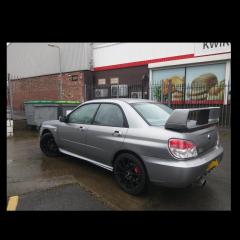
February 18, 201610 yr Not posted in a while but bought a new WRX yesterday, finally got myself into the Turbo world! Can't wait for it to be on the road! Not sure about the Wrapped bonnet that might have to come off not sure yet, but what d'you guys think!? Can finally come to shows and meets without being embarrassed at my lack of boost! ;) aha
February 18, 201610 yr Looking good - I like the contrast in bonnet / roof setup but would have to see how the wrap stood up over time, cracking motor though
February 18, 201610 yr Looks really nice! Cant beat boost I like the contrast tbh. Anything else been done?
February 18, 201610 yr Author Thanks both, love it ! It's being delivered Monday / Tuesday so will have some more pictures then! Few mods: STi spoiler + Badges (although I'll probably take STi badges off) Perrin Spoiler fin STi front diffuser STi rear diffuser Prodrive mudflaps Jap speed back box Performance discs and pads Upgraded head unit + reverse camera Sparco racing alloys Wax oiled underneath Should make good fun ! :)
February 18, 201610 yr welcome to the boost club and with a very nice motor as well,i like the bonnet fits silver nice,only thing i would change is i would stick another couple rear wing perrin stiffis in dont like the 1 in the middle,
February 19, 201610 yr Author Haha, it's a dream to drive in comparison to my RX! I thought that about the Perrin Fin, was either going to add more or take that one out ! One on its own does look a little strange ! Lol :L





Create an account or sign in to comment