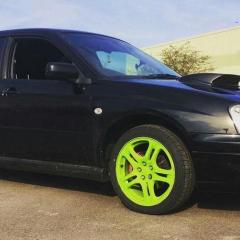
April 21, 20169 yr Hello one and all! I'm very excited to say I am now the proud owner of a 2003 blob-eye Impreza gx. The picture was taken the day after I picked it up and gave it it's first proper blast. I will probably spend a hideous amount of time scrolling through the site looking for any tips and tricks I can find. This is a pretty decent step up for me as before this I owned a Suzuki Swift which I adored and still have as a project car. Hopefully over the coming months this car will start to transform into something a little more unique, but for now, it's awesome! (even if it needs some serious lowering) I can't wait to really start learning the in's and out's of these awesome cars, from N/A impreza's like mine, all the way up to the brand new STI. And yes, I'm keeping the green wheels. :D
April 21, 20169 yr Hello & welcome feel free to get stuck in we're all friendly here Sent from my SM-G930F using Tapatalk
April 21, 20169 yr Author Well they need a recondition as they have a bit of curb rash, but I like that they are different, easy to spot in the dark! From what I've read of the forum I must say that everyone seems very helpful and friendly.



Create an account or sign in to comment