Do Not Sell My Personal Information Jump to content
View in the app

A better way to browse. Learn more.

Subaru Owners Club UK | Subaru Forums

A full-screen app on your home screen with push notifications, badges and more.

To install this app on iOS and iPadOS
  1. Tap the Share icon in Safari
  2. Scroll the menu and tap Add to Home Screen.
  3. Tap Add in the top-right corner.
To install this app on Android
  1. Tap the 3-dot menu (⋮) in the top-right corner of the browser.
  2. Tap Add to Home screen or Install app.
  3. Confirm by tapping Install.

Featured Replies

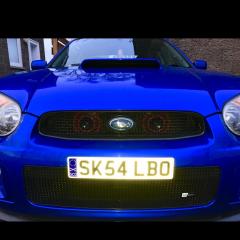
Just thought l would post some pics of the car when l bought it in September till today...

Few niggles along the way but l must say, im loving it more than any other car lve owned...

Feel free to comment, oh and im buying mudflaps, Red or Blue...?

Thanks

scoob11.PNGscoob12.PNGscoob10.PNGscoob8.JPGscoob7.JPGscoob6.JPGscoob.JPGscoob5.JPGscoob1.JPGscoob2.JPGscoob3.JPGscoob4.JPG


Looking good so far, nice and clean :)

  • Author
1 minute ago, Hudson said:

Looking good so far, nice and clean :)

Thanks mate... :)

Yes have to agree looks very clean. I went blue mud flaps on my blue sti 👍👍👍😎

Looks nice and i'd say blue or black mudflaps


  • Author

Think I'm gonna go blue guys....

next question, STI logo or WRX...?

  • Author

Thanks for the kind comments, it's appreciated 👍👍

  • 5 weeks later...

Aup mate car looks mint as ive said before.what splitter is that as its just what im after 😆

  • Author
4 hours ago, RpsChesterfield said:

Aup mate car looks mint as ive said before.what splitter is that as its just what im after 😆

Hey buddy, the splitter was from HT Autos.. it's a v-Ltd splitter l beleive

 made some other changes since these pics....

thanks mate 👍

IMG_0485.JPG

IMG_0486.JPG

Ordered one mate 😎 cheers


Create an account or sign in to comment


Background Picker
Customize Layout

Configure browser push notifications

Chrome (Android)
  1. Tap the lock icon next to the address bar.
  2. Tap Permissions → Notifications.
  3. Adjust your preference.
Chrome (Desktop)
  1. Click the padlock icon in the address bar.
  2. Select Site settings.
  3. Find Notifications and adjust your preference.