Do Not Sell My Personal Information Jump to content
View in the app

A better way to browse. Learn more.

Subaru Owners Club UK | Subaru Forums

A full-screen app on your home screen with push notifications, badges and more.

To install this app on iOS and iPadOS
  1. Tap the Share icon in Safari
  2. Scroll the menu and tap Add to Home Screen.
  3. Tap Add in the top-right corner.
To install this app on Android
  1. Tap the 3-dot menu (⋮) in the top-right corner of the browser.
  2. Tap Add to Home screen or Install app.
  3. Confirm by tapping Install.

Featured Replies

Hi everyone..

New to this forum.. Please chime in if you are near to me, love to meet fellow scooby enthusiasts..


Steve..


Welcome to the club


Sent from my HTC One M9 using Tapatalk


  • Author

Thanks for the welcome..!

Does it not show my car details and pic? Perhaps not on your moby..?

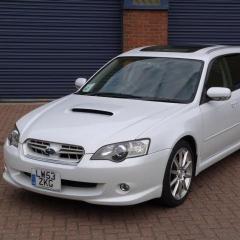
Car is a 2004 (gen IV) twinscroll spec-b wagon.. LPG converted and remapped by Bob Rawle, and currently doing a swap out of the seats in favour of leather facelift ones.. Owned it for about a year and am trying to learn how to repair/maintain it myself..

I am currently scaling the north face of very steep learning curve, no sign of the summat yet..

In case it not shown either, am in the cotswolds, more specifically Nailsworth, near Stroud..


Welcome! Rare to come across these now, looking good!

Welcome aboard mate

Create an account or sign in to comment


Background Picker
Customize Layout

Configure browser push notifications

Chrome (Android)
  1. Tap the lock icon next to the address bar.
  2. Tap Permissions → Notifications.
  3. Adjust your preference.
Chrome (Desktop)
  1. Click the padlock icon in the address bar.
  2. Select Site settings.
  3. Find Notifications and adjust your preference.