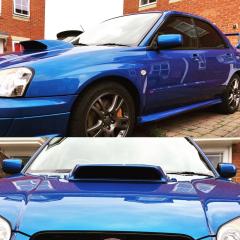
July 7, 20178 yr Hey everyone, I have recently purchased myself a lovely toy in the form of a '03 WRX STI with the Prodrive performance pack. Its been exceptionally well looked after and I plan to keep that going while I have it. It's a car I have always wanted to own since I started watching rallying when I was a wee nipper! It sure doesn't disappoint. No plans modify it.. maybe some gold wheels but the choices are seemingly endless!! Rota Grid Drift, Speedline Turini's... who knows... I'll be going to Japshow 2017 so look forward to meeting some of the other members and having a look at everyone's wheel setup :) Cheers Al
July 7, 20178 yr Wotcha and welcome - clean motor that, we have a few members going to various different shows to plenty of opportunities to meet up
July 7, 20178 yr Looks lovely...that first pic the car looks almost as deep blue as mine [emoji6] Sent from my iPhone using Tapatalk
July 9, 20178 yr Good to see you at Japshow today! The car looks great and Im proper jealous. Hope you had a good day ☺



Create an account or sign in to comment