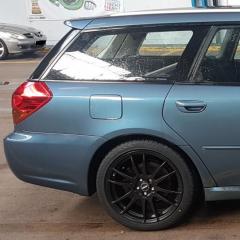
December 1, 20178 yr Hi, new to the forum so thought I'd say hello! Picked up my first Subaru a few months ago, a 2006 Legacy 3.0 spec B shown in the image that's hopefully attached. Lovely car with a few little issues that I'm hoping to learn more about to get fixed over time. Stumbled across the forum and it seems a good place to learn things so I hope it's ok to ask questions?! Bought at a reasonable price with ~110000 miles on the clock, I'm a low mileage driver at less than 5k a year, after my previous car (Mondeo estate) finally died after becoming increasingly troublesome, I was after an estate with better reliability, and Subarus have a good rep, so I kept an eye open for them. Not many about though, so when this came up locally, I went for it even though I wasn't looking for something quite so rapid, glad I did though, it's great fun when I'm in the mood for a blast... VED is a bugger though :)
December 1, 20178 yr Author 10 minutes ago, Greenmamba said: Welcome, ask away, plenty of wise folk here! Thank you, I see you're just round the corner in Chigwell, Romford here!



Create an account or sign in to comment