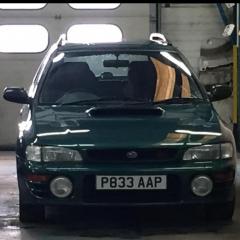
December 7, 20178 yr Hi could someone tell me what model headlights I have it’s a p reg Sent from my iPhone using Tapatalk
December 7, 20178 yr Author look like ebay angle eye iirc I want to replace them with standard headlights but don’t no which model I need Sent from my iPhone using Tapatalk
December 7, 20178 yr Author ah sorry i get ya, have you got a full front pic of your car? Sent from my iPhone using Tapatalk
December 8, 20178 yr These should fit. You will need the indicators though. You can get crystal clear headlights and indicators which look better in my opinion.
December 12, 20178 yr Author These should fit. You will need the indicators though. You can get crystal clear headlights and indicators which look better in my opinion. I’ve sourced some now from eBay I’m trying to get rid of that chav kind of lookSent from my iPhone using Tapatalk
December 12, 20178 yr They came with crystal clear ones, I am not sure if they were an optional extra or as standard on a 2000 turbo. If you’re fog lights aren’t clear ones then the standards will look best.
December 12, 20178 yr Author I think my fogs are clear.Some plank has put a black tint on them Sent from my iPhone using Tapatalk
December 12, 20178 yr Crystal cleats look ace in my opinion. Why on earth would someone put a dark tint on a front facing fog light? You said it, someone who’s a plank. Ha.



Create an account or sign in to comment