Do Not Sell My Personal Information Jump to content
View in the app

A better way to browse. Learn more.

Subaru Owners Club UK | Subaru Forums

A full-screen app on your home screen with push notifications, badges and more.

To install this app on iOS and iPadOS
  1. Tap the Share icon in Safari
  2. Scroll the menu and tap Add to Home Screen.
  3. Tap Add in the top-right corner.
To install this app on Android
  1. Tap the 3-dot menu (⋮) in the top-right corner of the browser.
  2. Tap Add to Home screen or Install app.
  3. Confirm by tapping Install.

Featured Replies

Hello everyone, I'm picking up a 2008 Forester this weekend so here I am joining up ...I hope I can contribute a bit as well as ask a few questions along the way.

Hope everyone had a nice Christmas and all the best for 2019

Nice to meet you

Brack    


  • 2 weeks later...
  • Author

Thanks Greenmamba,

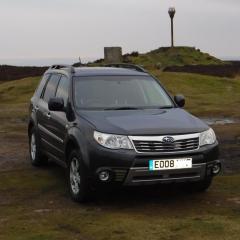
took some pics while up on the moors today 🙂

car1.jpg

car2.jpg

car3.jpg

car4.JPG

Recently got the same year in diesel, very happy so far

20181030_151943.jpg

  • Author
6 hours ago, Sambam said:

Recently got the same year in diesel, very happy so far

20181030_151943.jpg

Me too very happy, looking good in silver mate ...might see you on the A66  🙂  


  • Author

Cheers mate 🙂      

Create an account or sign in to comment


Background Picker
Customize Layout

Configure browser push notifications

Chrome (Android)
  1. Tap the lock icon next to the address bar.
  2. Tap Permissions → Notifications.
  3. Adjust your preference.
Chrome (Desktop)
  1. Click the padlock icon in the address bar.
  2. Select Site settings.
  3. Find Notifications and adjust your preference.