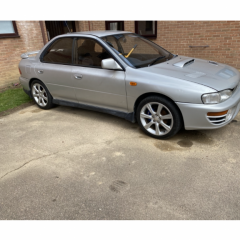
May 19, 20196 yr Hello everyone I’m new to this, I recently got a Subaru Impreza 1994 import and I’m desperately trying to find a new steering column cowling. Is anyone selling one or point me in the right direction pls! Cheers Falcon
May 19, 20196 yr Any good? https://www.ebay.co.uk/itm/Subaru-Impreza-V1-2-Ignition-Cowling/223195076937?hash=item33f7769949:g:MBgAAOSwutlbyQ6m Oh and welcome along 👍
May 20, 20196 yr Author 13 hours ago, Bahnstormer said: Any good? https://www.ebay.co.uk/itm/Subaru-Impreza-V1-2-Ignition-Cowling/223195076937?hash=item33f7769949:g:MBgAAOSwutlbyQ6m Oh and welcome along 👍 Just bought that one thanks again. Can start putting it back together and getting it back on the road 👍👍
May 20, 20196 yr Still looks fairly clean though! Best of luck bringing it back to it's former glory 👍
May 20, 20196 yr Author It is very clean I’m the 3rd owner the person I bought it off of got it when it come into the country. going to keep it all original
May 22, 20196 yr Author 6 hours ago, Jay762 said: Looking good - just a bit of TLC will have that looking mint Thanks. Slowly getting there mate 👍



Create an account or sign in to comment