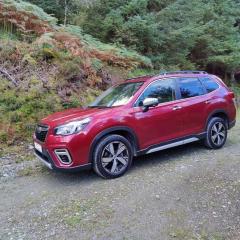
October 3, 20214 yr Hi all, now had my first Subaru for two weeks now, Forester e-boxer (2019 plate) and I love it! Former Suzuki owner, loved my Vitara but it died and the parts were ludicrously overpriced, so timely upgrade. Speaking to an independent specialist, the parts to do the same work on the Forester would cost less than half the price, so looks like I'm already onto a win. If anyone knows of existing threads that can link me to info on UK Forester accessories catalogue, I'd much appreciate it. I'm keen to see what little "quality of life" extras I can pick up. Hope everyone has had a great weekend Glad to join team Subaru 😄
October 4, 20214 yr 21 hours ago, FoxWill said: Hi all, now had my first Subaru for two weeks now, Forester e-boxer (2019 plate) and I love it! Former Suzuki owner, loved my Vitara but it died and the parts were ludicrously overpriced, so timely upgrade. Speaking to an independent specialist, the parts to do the same work on the Forester would cost less than half the price, so looks like I'm already onto a win. If anyone knows of existing threads that can link me to info on UK Forester accessories catalogue, I'd much appreciate it. I'm keen to see what little "quality of life" extras I can pick up. Hope everyone has had a great weekend Glad to join team Subaru 😄 I hope you enjoy the new car.
October 4, 20214 yr Wotcha and welcome. Feel free to share photos, get stuck in - all friendly on here 🙂



Create an account or sign in to comment