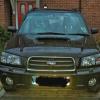
December 6, 201312 yr Hi, just brought our first Subaru forester 2.0xt 54 plate & and there's a big smile every time we drive it even the kids love it:)
December 6, 201312 yr Hi mate welcome to S.O.C Be great if you can post some pictures up if you get chance we do like our pictures here :) And have a few members from your way on here, so please feel free to have a look around the forums and join in. fantastic bunch on here :)
December 7, 201312 yr Welcome along. If your free and not busy tomorrow there's a few from your area popping down to my local Scoobies meet in surrey. Not far from Sandown race course. Be a chance to meet up with some like minded enthusiast and it's held at a family pub who serve grub. Kids are welcome and the aren't any hoonigans so it's a nice friendly meet.
December 7, 201312 yr Hi, just brought our first Subaru forester 2.0xt 54 plate & and there's a big smile every time we drive it even the kids love it:) Hello and welcome, I know what you mean about the smile :) Sent from my iPhone using Tapatalk
December 7, 201312 yr Wotcha and welcome - they do put a big grin on your face that is for certain :)
December 7, 201312 yr Author Thanks all, will try post a pic of forester soon also thinking of fitting a rear spoiler & exhaust back box to give it the Subaru sound but can't find parts anywhere thanks again for the welcome Ian:)
December 7, 201312 yr looking forward to them :) And feel free to join in on the forums as I said before all friendly on here as long as you have a sense of humour anyway :D



Create an account or sign in to comment